SELECTED WORK

A small number of examples. A clear view of how I build.

Each case shows the need I saw, how I thought it through, what I designed, and why I made those choices.

THREE CASES01PAIR Early Literacy Systems Suite02From Screening Signal to Instructional Response03PAIR Literacy Pathway
01 • SYSTEM + RESOURCE DESIGN

PAIR Early Literacy Systems Suite

Five connected K–3 resources that help teams understand literacy, choose a priority, plan instruction and support, and review their progress.

THE NEED

School teams have to connect literacy research, assessment, instruction, intervention, and family communication. Even with strong resources, it can be unclear who should do what or which need to address first.

HOW I THOUGHT ABOUT IT

I gave each resource a distinct job and connected it to the others. A team can choose a focus, deepen its literacy knowledge, plan learning, communicate with families, and record its next steps without starting over at each stage.

WHAT I DESIGNED

15 diagnostic cases

3 professional learning / teacher team sessions

8 implementation tools

A 90-day implementation path

Resources for explaining literacy to families

WHY IT WAS DESIGNED THAT WAY

The suite was designed so knowledge, decisions, learning, communication, and implementation reinforce one another instead of operating as separate initiatives.

WHAT THIS WORK DEMONSTRATES
Designing connected systemsLiteracy depthMaking research useful in practiceResource developmentPlanning how the work will happen
EXAMINE THE WORK

The decision record behind the system.

Selected excerpt from Tool 03, PAIR Implementation Tools Collection. The full suite connects this record to assessment routines, teacher learning, and plans for follow-through.

TOOL 03 • SELECTED EXCERPT

Data-to-Instruction Decision Record

Move from broad risk to a clearly identified skill and instructional response.

  1. 01Screening signal + source
  2. 02Follow-up diagnostic evidence
  3. 03Specific skill not yet secure
  4. 04Strength or asset to preserve
  5. 05Instructional response
  6. 06Progress measure + frequency
  7. 07Review date / decision point

Why these fields: The record asks teams to preserve a learner’s strengths, explain the instructional match, and set a review point. It makes the reasoning available for the next conversation.
Explore the Suite demonstration
02 • PROFESSIONAL LEARNING DESIGN CONCEPT

From Screening Signal to Instructional Response

A professional learning design concept that helps educators investigate a literacy concern, decide what to teach, and explain their reasoning. The sample includes a practice case, facilitator prompts, and signs of understanding to look for.

THE NEED

A screening result can identify risk without explaining the exact skill need or the appropriate instructional response. Teams may move too quickly from a broad score to a broad intervention.

HOW I THOUGHT ABOUT IT

I wanted educators to work through the decision themselves: examine the evidence, check an explanation, hear feedback, and explain why a teaching response fits.

WHAT I DESIGNED

A realistic practice case

A modeled think-aloud

Team discussion of assessment findings

Decision practice

Peer feedback

A tool for applying the learning

WHY IT WAS DESIGNED THAT WAY

Every component is organized around one purpose: improving the quality of the instructional decision that follows the assessment signal.

WHAT THIS WORK DEMONSTRATES
Adult-learning designPlanning purposeful discussion and practiceDecision-makingUnderstanding and using assessmentPlanning for use after the session
EXAMINE THE DESIGN

One case. A decision worth discussing.

A short portfolio learning sequence, adapted from Scenario 1 in The Early Literacy Strategist’s Guide and the Suite’s decision record. The scenario is fictional; the sequence is a design concept.

CASE EXCERPT • KINDERGARTEN

Sam knows letter sounds. Reading a whole word is not yet reliable.

Sam names letters and produces their sounds in isolation. With a simple consonant–vowel–consonant word, he pauses after each sound or guesses instead of blending the word.

The question for the team: What do we know, what are we assuming, and what evidence would help us choose instruction?

Open the facilitator sequence and reasoning
  1. Notice before naming a cause.

    Ask participants to separate observed letter–sound knowledge from the difficulty combining those sounds into a word. A broad reading concern alone does not establish the cause.

  2. Model the next question.

    “Can Sam blend spoken sounds without print? Can he apply the same sound knowledge while looking at a word?” Make both questions visible before selecting an instructional response.

  3. Connect the findings to instruction.

    If oral blending also needs support, model and practice blending. If oral blending is secure but blending with print is not, examine how Sam connects and blends sounds while reading. Confirm the need using appropriate follow-up evidence.

  4. Produce a decision record.

    Have pairs name the strength to preserve, the evidence still needed, a response matched to the findings, and a progress check with a review date.

  5. Give feedback and plan where to use it.

    A partner asks, “Which evidence supports that response?” Each participant identifies a current team routine where the record could improve a real decision.

Evidence of learning to look for: Participants distinguish observations from assumptions, justify a response using skill evidence, and identify what they would monitor.
03 • DIGITAL LITERACY RESOURCE + USER EXPERIENCE

PAIR Literacy Pathway

A pilot-stage, informal literacy skills check and planning resource designed primarily for families. It helps adults identify a starting skill and develop it at home through individualized activities, guidance, rechecks, and PAIR’s wider collection of resources and blogs. Educators and community partners can also use and share it.

THE NEED

Adults may recognize that a learner needs literacy support without knowing the specific skill need or where to begin.

HOW I THOUGHT ABOUT IT

Age and grade provide context, but they do not show which literacy skill needs attention. I designed tasks that follow the learner’s responses, check skills that later learning depends on, and give adults clear directions.

WHAT I DESIGNED

Age-informed starting points and next tasks guided by responses

Structured literacy skill tasks

Administration guidance and safeguards

Recorded responses and saved progress

Individualized results with practical activities

Recheck guidance and a printable report

User feedback collection

Mobile-responsive experience

WHY IT WAS DESIGNED THAT WAY

Skill identification is only the beginning. The pathway connects the result to manageable home practice, while PAIR’s resources and blogs help families understand the skill and keep supporting its development. It is an educational planning resource, not a diagnostic assessment or validated screener.

WHAT THIS WORK DEMONSTRATES
Foundational literacy expertiseUsing responses to identify skill needsMaking research useful in practiceDigital resource designDesigning how responses guide the next taskDesigning for the people using the resourceUser experienceImplementation planningContinuous improvement
PRODUCT DESIGN IN PRACTICE

Identify the skill. Support its development at home.

Pathway is one entry point into PAIR’s family literacy support. Its individualized results connect families to practice; the wider PAIR website provides resources and blogs to continue learning.

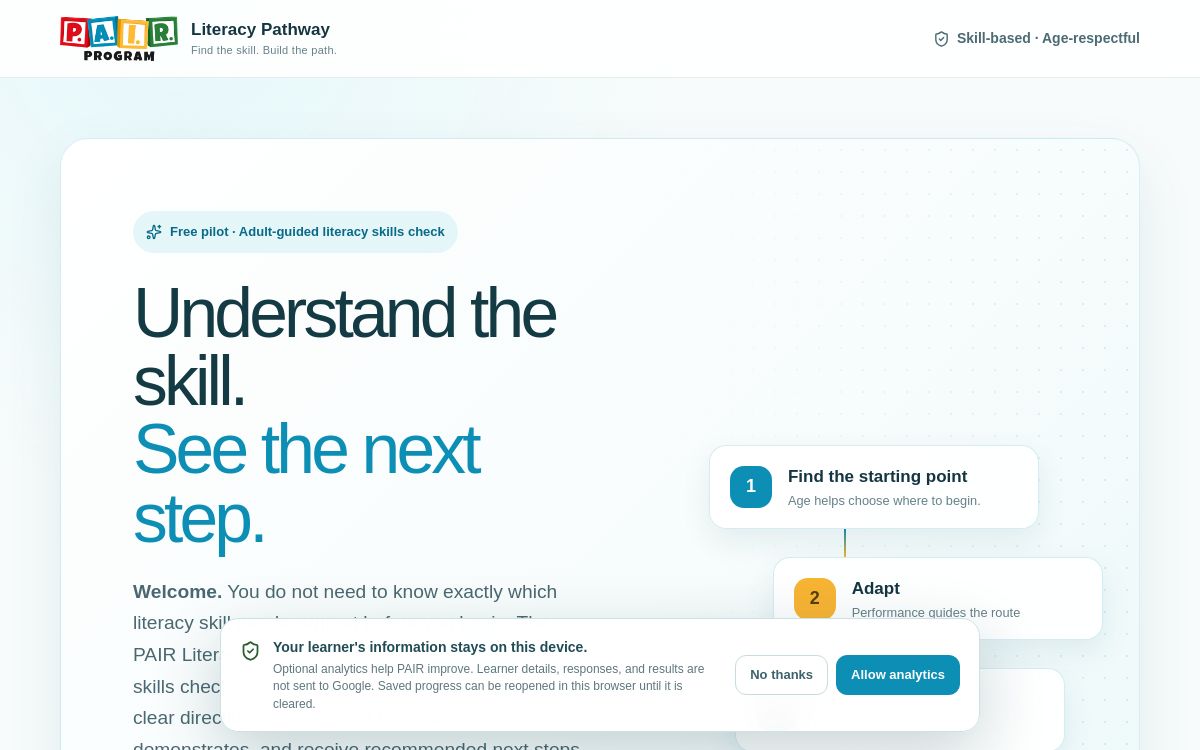
PAIR Literacy Pathway welcome screen, introducing a foundational literacy skills check and practical next steps.
The live Pathway entry experience. Pilot-stage educational planning resource.
See the decisions behind the experience
01 • ADMINISTRATION

Keep the task focused on the skill.

Screen-position prompts distinguish oral tasks from tasks that require print. Repeat guidance and assistance indicators help adults record how the response was obtained.

02 • SKILL PROGRESSION

Let performance guide the next step.

Age helps choose an entry point. Responses guide the next tasks, including checks of skills the learner needs before moving forward.

03 • FAMILY FOLLOW-THROUGH

Give families something they can use.

Individualized activities, a printable report, and recheck guidance connect a starting skill to home practice. PAIR’s resources and blogs provide continued support.

Current status: Pilot resource with a feedback collection process. Refinement focuses on administration clarity, useful results, and practical home use.

About the materials

Selected excerpts and adapted examples make the work available to examine while protecting the full proprietary resources. Literacy scenarios are fictional practice cases. Design concepts and pilot resources are identified explicitly; student, participant, and institutional outcomes are not implied.

EXPLORE THE LEADERSHIP AREAS

See the expertise and approach behind the work.

LET’S CONNECT

Looking for a leader who can think and build?

I welcome conversations about education strategy, literacy leadership, professional learning, systems design, and implementation.

Start a conversation